
DHT20 Specifications #
- Input Voltage: 2.2V to 5V DC
- Accuracy: Temperature ±0.5°C, Humidity ±3%
Pin Definitions #
| Pin (Left to Right) | Name |
|---|---|
| 1 | VDD |
| 2 | SDA |
| 3 | GND |
| 4 | SCL |
Connecting Raspberry Pi Pico and DHT20 #
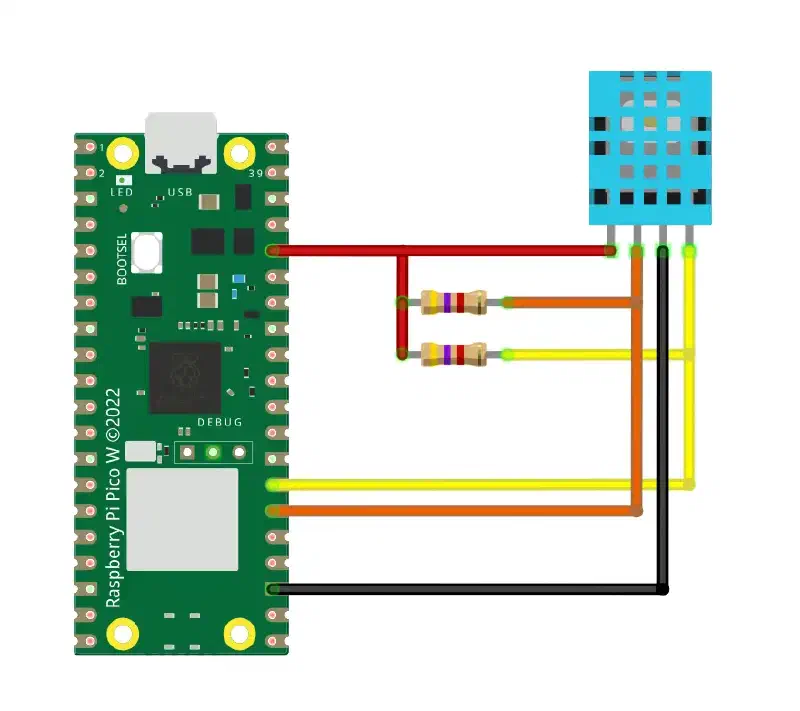
Both resistors are 4K7R.
Code #
Important
If you are using Thonny, please remove all Japanese characters from the code to ensure it runs properly.
Or download the English version from the GitHub link below.
dht20.py #
from machine import Pin, I2C
import time


cmd = bytearray(b'\xAC\x33\x00') # Measurement command
i2c_address = 0x38 # I2C address
humidity_data = 0.00 # Humidity data
temperature_data = 0.00 # Temperature data
json_data = " " # Temperature and humidity data in JSON format


# Initialize the DHT20 sensor
def init(SCL = Pin(21), SDA = Pin(20), FREQ = 10000):
    global i2c

    buff = bytearray(7) # Received data

    # Configure I2C communication
    i2c = I2C(0, scl = SCL, sda = SDA, freq = FREQ)

    i2c.writeto(i2c_address, cmd, True)
    time.sleep_ms(100)

    i2c.readfrom_into(i2c_address, buff, True)
    time.sleep_ms(100)

    # Factory check
    if (buff[0] & 0x18) == 0x18:
        print('DHT20 Initialization Successful')
    else:
        print('DHT20 Initialization Failed')


# Receive and parse measurement data
def get_data():
    global humidity_data
    global temperature_data

    buff = bytearray(7) # Received data

    # Send measurement command and receive data
    while True:
        i2c.writeto(i2c_address, cmd, True)
        time.sleep_ms(100)

        i2c.readfrom_into(i2c_address, buff, True)
        time.sleep_ms(100)

        # Check data transmission status
        if not (buff[0] | 0x7F) != 0x7F or buff[0] == 0x00:
            break

    # Parse data
    humidity_data_temp = (buff[1] << 12) | (buff[2] << 4) | ((buff[3] >> 4) & 0x0f)
    temperature_data_temp = ((buff[3] & 0x0f) << 16) | (buff[4] << 8) | (buff[5])
    humidity_data = humidity_data_temp / 1048576 * 100
    temperature_data = temperature_data_temp / 1048576 * 200 - 50

    # Round data to 2 decimal places
    humidity_data = round(humidity_data, 2)
    temperature_data = round(temperature_data, 2)


# Convert data to JSON format
def to_json():
    global json_data
    json_data = "{\"temperature\": " + ('%.2f' % temperature_data) + \
                ", \"humidity\": " + ('%.2f' % humidity_data) + \
                "}"
    return json_data
main.py #
from machine import Pin
import time, dht20

led = Pin("LED", Pin.OUT)

dht20.init()
time.sleep_ms(100)


while True:
    led.toggle()
    dht20.get_data()
    print(dht20.to_json())
    print(dht20.temperature_data)
    print(dht20.humidity_data)
    time.sleep(3)