
WordPress のブロックテーマでは、直観的にウェブサイトを編集することができるのでとても便利であるが、カスタマイズ部分が少ない欠点があります。
このときに、テーマの functions.php を配置して以下のようなカスタムスタイルを追加ことができます。
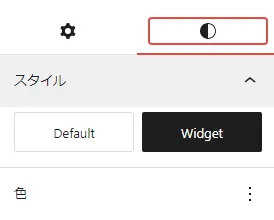
コード #
function themeslug_register_block_styles() {
    register_block_style( 'core/group', array(
        'name' => 'default',
        'label' => __( 'Default', 'themeslug' ),
        'is_default' => true,
        'inline_style' => '.wp-block-group.is-style-default {}'
    ) );

    register_block_style( 'core/group', array(
        'name' => 'widget',
        'label' => __( 'Widget', 'themeslug' ),
        'inline_style' => '.wp-block-group.is-style-widget {
            background-color: #faf0e6;
            border-radius: 25px;
        }'
    ) );
}
add_action( 'init', 'themeslug_register_block_styles' );
コードの分析 #
themeslug_register_block_styles() という関数を作ります。他の名前も大丈夫です。
そしてデフォルトのスタイルを設定します。
register_block_style( 'core/group', array(
    'name' => 'default',
    'label' => __( 'Default', 'themeslug' ),
    'is_default' => true,
    'inline_style' => '.wp-block-group.is-style-default {}'
) );
次はカスタムスタイルを作ります。
register_block_style( 'core/group', array(
    'name' => 'widget',
    'label' => __( 'Widget', 'themeslug' ),
    'inline_style' => '.wp-block-group.is-style-widget {
        background-color: #faf0e6;
        border-radius: 25px;
    }'
) );
name はカスタムスタイルの名前、そして inline style はカスタムスCSSの設定場所です。
ここはグループというブロックをカスタマイズするので、CSS は .wp-block-group とします。
スタイル名は widget ので、後ろは .is-style-widget とします。
最後には add_action() で作った関数を実行します。
add_action( 'init', 'themeslug_register_block_styles' );