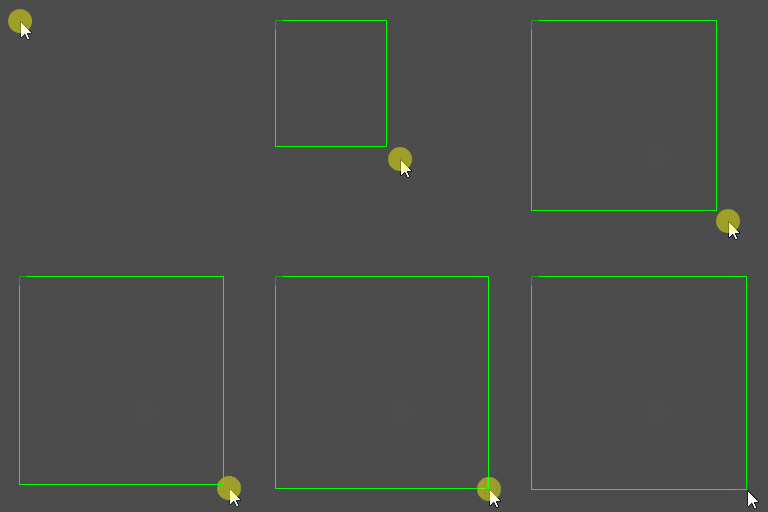
Results #

How to Create It #
Godot version is 4.1.
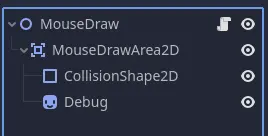
Configure the Node in the Scene as follows.
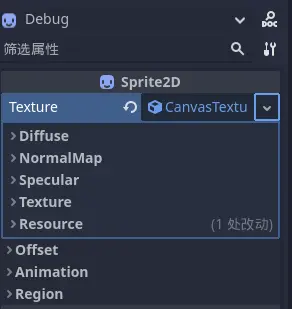
Configure the Sprite2D for debugging as follows.
Load the Child into the singleton node and set the variables.
@onready var area = $MouseDrawArea2D
@onready var collision = $MouseDrawArea2D/CollisionShape2D
@onready var debug = $MouseDrawArea2D/Debug
var draw_start_point : Vector2
var draw_rect_point : Vector2
var drawing : bool
Set up the input event.
func _input(event):
    if event is InputEventMouseButton:
        match event.pressed && event.button_index == MOUSE_BUTTON_LEFT:
            true:
                draw_start_point = get_global_mouse_position()
                draw_rect_point = draw_start_point
                drawing = true
            false:
                drawing = false

    elif event is InputEventMouseMotion && drawing:
        draw_rect_point = get_global_mouse_position()
Set up the draw function.
func _draw():
    if drawing: draw_rect(Rect2(draw_start_point, draw_rect_point - draw_start_point), Color.GREEN, false)
Set up the process function.
func _process(delta):
    queue_redraw() # update _draw()

    if drawing:
        # collision
        collision.global_position = (draw_rect_point + draw_start_point) / 2
        collision.scale = draw_rect_point - draw_start_point

        # Debug
        debug.global_position = (draw_rect_point + draw_start_point) / 2
        debug.scale = draw_rect_point - draw_start_point

    else:
        # collision
        collision.global_position = Vector2.ZERO
        collision.scale = Vector2.ZERO

        # Debug
        debug.global_position = Vector2.ZERO
        debug.scale = Vector2.ZERO

    return delta
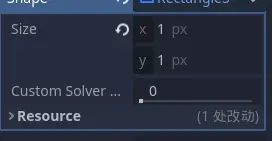
Important
Set both sizes like this.